 Code-splitting React components
===============================
Several techniques have been in use for code-splitting React components. A common approach is applying dynamic `import()` to lazy-load Route components for an application — this is usually referred to as **_route-based_** _code-splitting_.
However, there is a very popular package for code-splitting React components called [**react-loadable**](https://github.com/jamiebuilds/react-loadable). It provides a higher-order component (HOC) for loading React components with promises, leveraging on the dynamic `import()` syntax.
Consider the following React component called `MyComponent`:
Code-splitting React components
===============================
Several techniques have been in use for code-splitting React components. A common approach is applying dynamic `import()` to lazy-load Route components for an application — this is usually referred to as **_route-based_** _code-splitting_.
However, there is a very popular package for code-splitting React components called [**react-loadable**](https://github.com/jamiebuilds/react-loadable). It provides a higher-order component (HOC) for loading React components with promises, leveraging on the dynamic `import()` syntax.
Consider the following React component called `MyComponent`:
You clicked {count} times
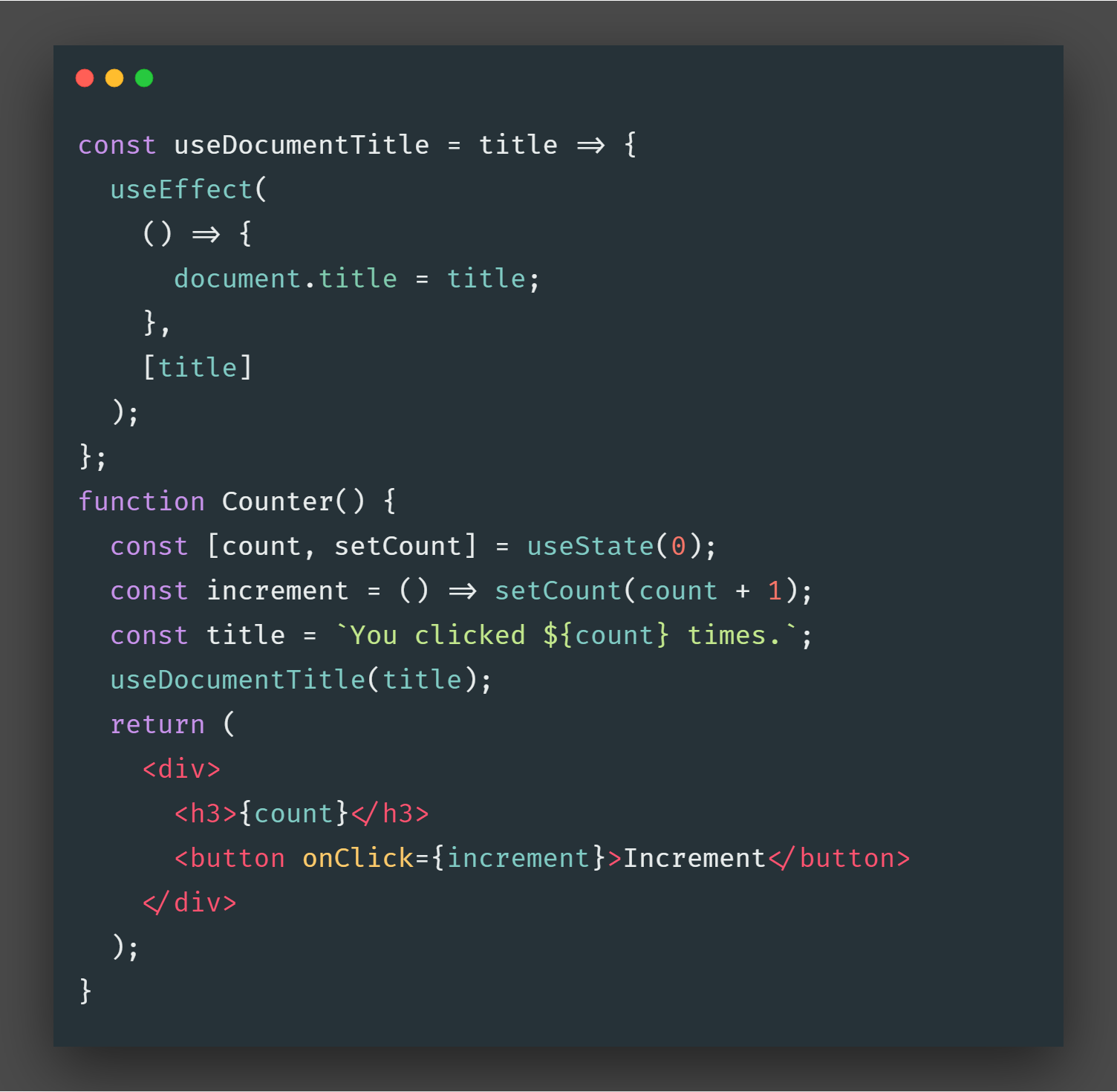
 It works well. I always prefer creating the component first and then extracting out the stateful logic from that function(component) and then putting it into another function(custom hook) and then just doing some refactoring so the component works well with our hook.
Let’s take the `useEffect` section out of the component and put it inside our new function `useDocumentTitle`.
It works well. I always prefer creating the component first and then extracting out the stateful logic from that function(component) and then putting it into another function(custom hook) and then just doing some refactoring so the component works well with our hook.
Let’s take the `useEffect` section out of the component and put it inside our new function `useDocumentTitle`.
 custom Hook
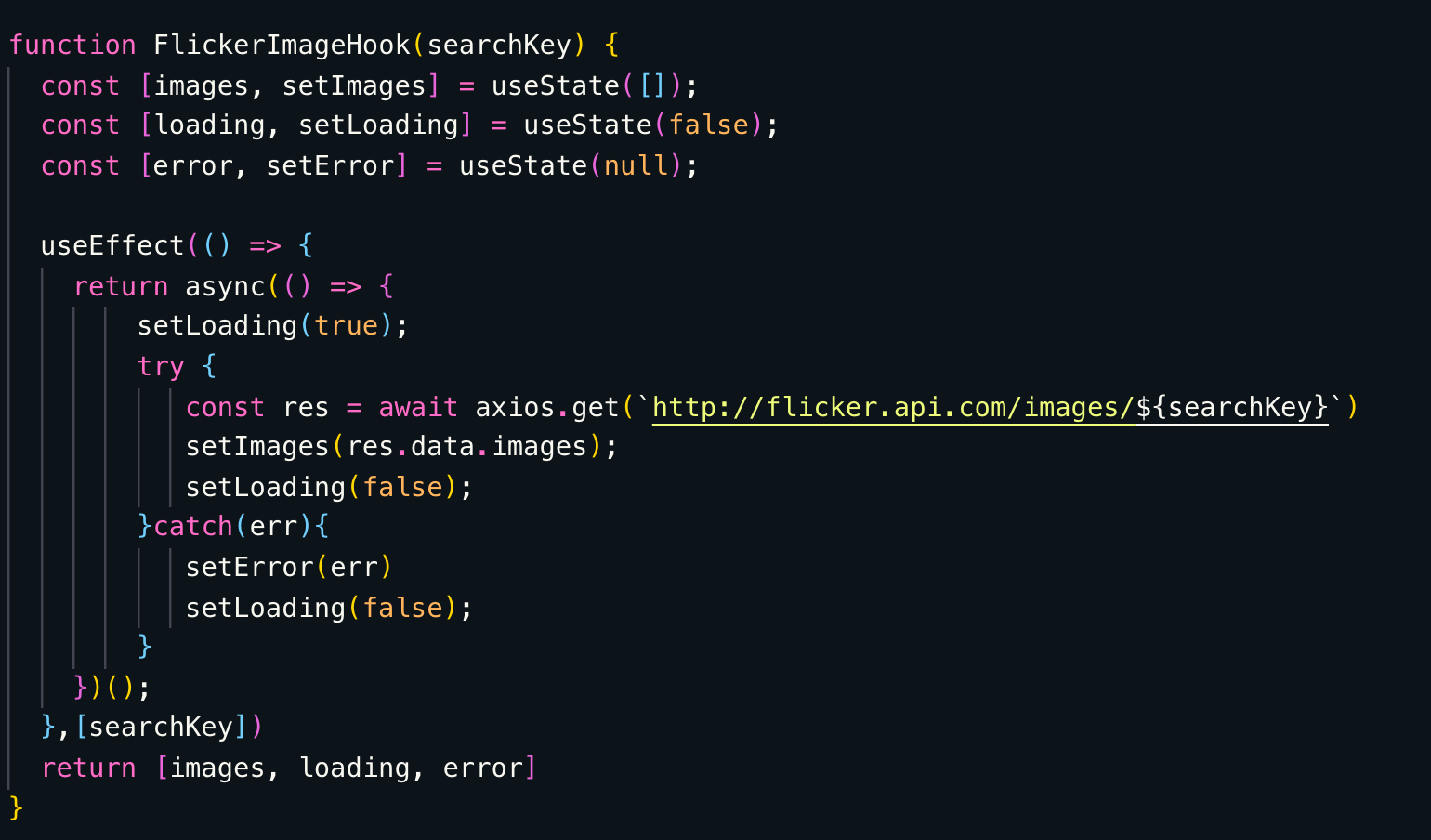
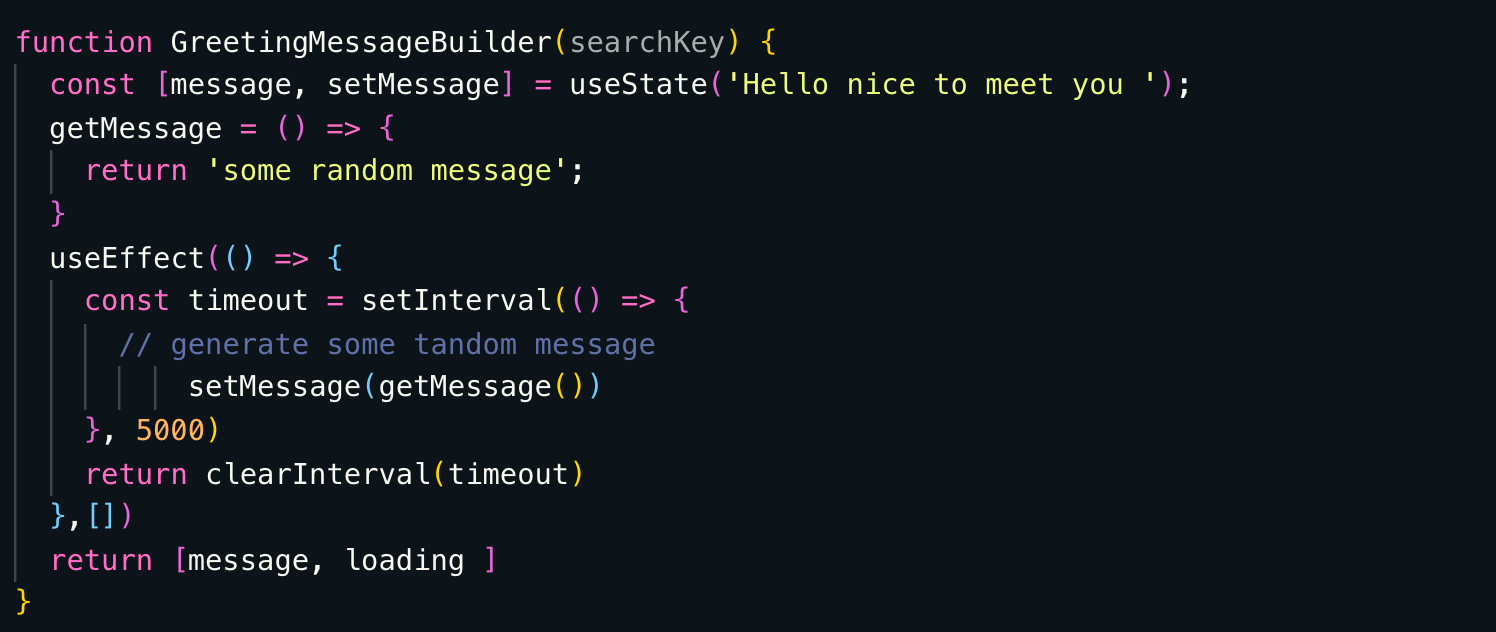
Now Similarly we can extract out login in a separate hook and call that Hooks logic to build application component feature, Let’s build Flicker Image Loader as a custom Hook which can give use Loading, data or error State
custom Hook
Now Similarly we can extract out login in a separate hook and call that Hooks logic to build application component feature, Let’s build Flicker Image Loader as a custom Hook which can give use Loading, data or error State
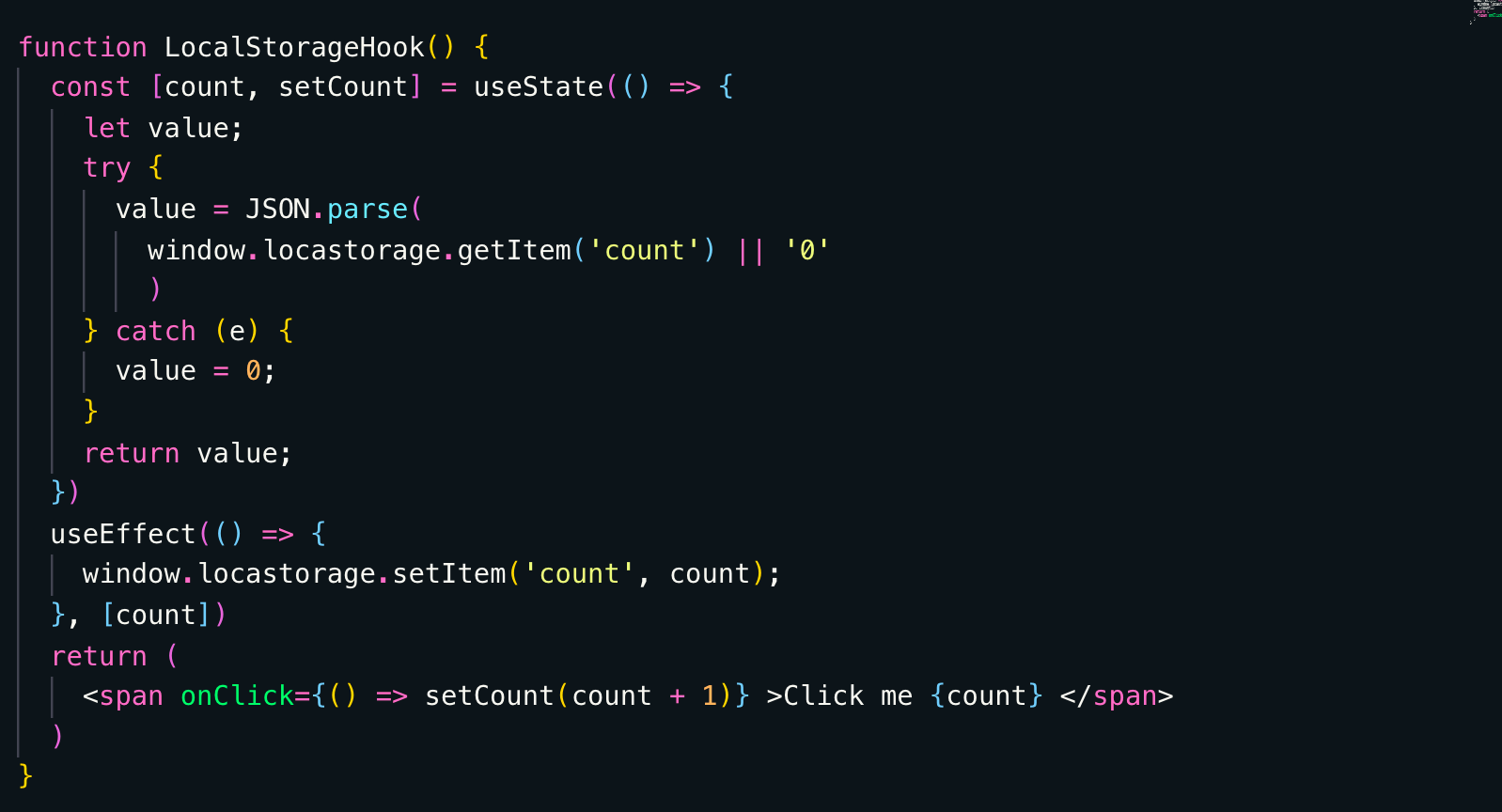 custom local storage Hook
Let’s Build another Hook to get Axios data from some image service
custom local storage Hook
Let’s Build another Hook to get Axios data from some image service
 React HOCs
==========
What are they?
--------------
A pattern for when we find ourselves repeating logic across components. They are not part of the `React` API.
What do they do?
----------------
They are functions that take components and return new components!
When to use?
------------
When you’re repeating patterns/logic across components.
A simple example is I want to create route Guard in React like if a user is not logged In then only he should be allowed to go to Login, same logic needed for Register, forgot password and other main public routes
React HOCs
==========
What are they?
--------------
A pattern for when we find ourselves repeating logic across components. They are not part of the `React` API.
What do they do?
----------------
They are functions that take components and return new components!
When to use?
------------
When you’re repeating patterns/logic across components.
A simple example is I want to create route Guard in React like if a user is not logged In then only he should be allowed to go to Login, same logic needed for Register, forgot password and other main public routes
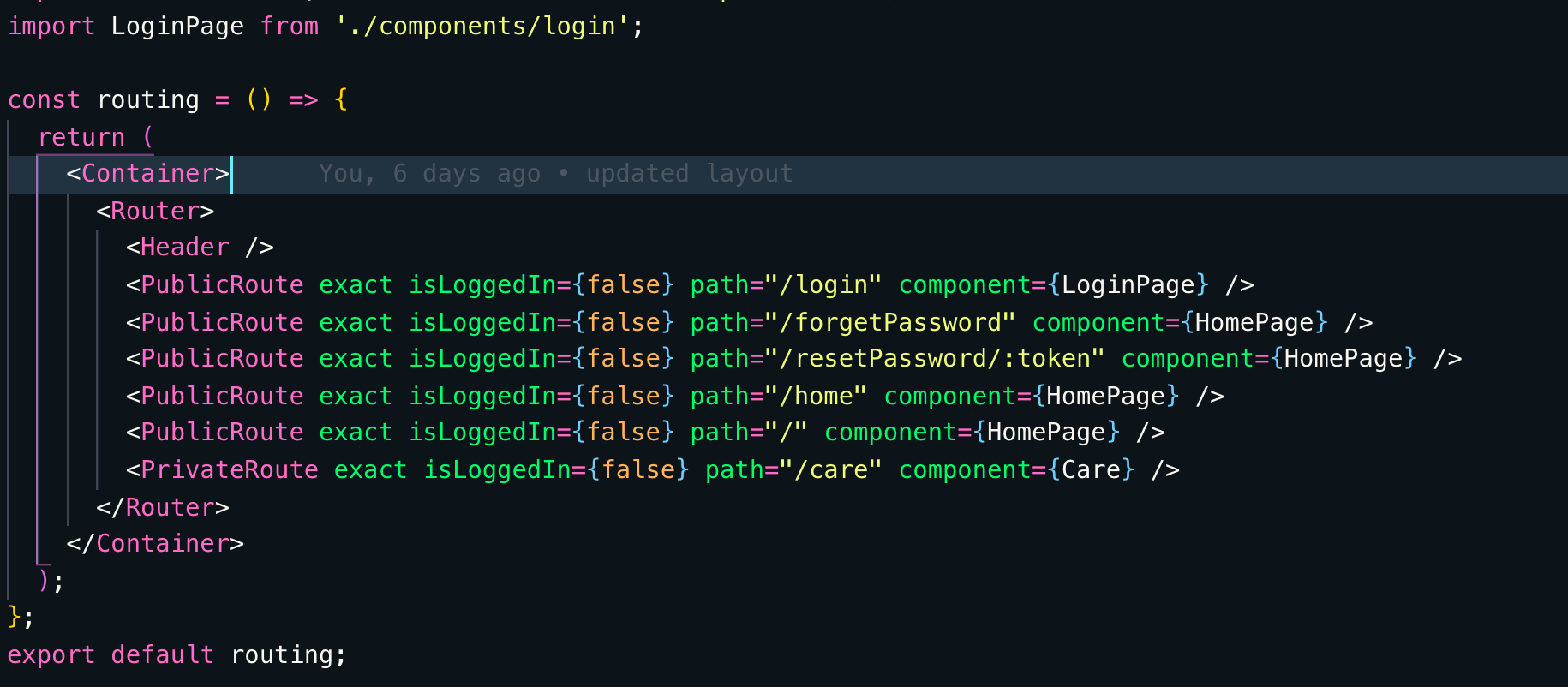 Here to copy same Logic on all public routes I have added a Higher Order Component named as **PublicRoute,** below is the Code for out HOC which is returning route component
 HOCs can be used to wrap something or execute logic before rendering main component like if you are logged in then go to /home page instead of login page.
You can understand this in plain English too
--------------------------------------------
If you ever thought “Is there a way by which I can simplify this such that I don’t need to rewrite the fetching logic again and again in all three views?”. Well, Higher-Order Component (HOC) provides a solution to such a kind of problems.
HOC is a powerful tool based on which many libraries are getting developed. The objective of this article is to explain how HOCs can help in simplifying and abstracting repeated logic in a React Applications.
Javascript, in general, can be treated as functional programming or object orient programming. HOCs are functional implementation of javascript. It has its similarities with the concept of Higher-Order functions.
Functions that operate on other functions, either by taking them as arguments or by returning them, are called higher-order functions.
```
function greaterThan(a) { // Higher order function
return function(b) {
return b > a;
}
}
```
greaterThan(10)(11) will be true.
```
var greaterThan10 = greaterThan(10);
```
And anywhere we can use greaterThan10(11) [ Which will be true ]. This helps in abstraction the inner details thereby giving us the ability to think about higher level.
Higher-Order components are based on this. Given a function (Functional component) which takes a component and gives back another component.
> _Function(component) => (component)_
1. How it benefits in abstracting repeated logic?
A function (Functional component in React) which takes a component and gives back another component. We do this because we can do something inside the function which can add more power to the resulting component.
We can treat this as an inheritance to React. How? We can treat the input functional component as a Parent and the resultant as the inherited components. So the exact benefits are:
1. Add / Update New props.
2. Filter out props.
3. Reuse Logic by maintaining an internal State.
4. Change the Rendering of component based on any logic.
Simple example using functional Component —
```
import React from 'react';
**export const WrapperComponent(WrappedComponent) => {** // Wrapped Component is the parent component
**return class HigherOrderComponent extends React.Component {** ** // Returns a new component
// Bring any reusable logic here.
// For example Add a new prop to the existing props
// or filter props based on the need**
render() {
return (
**< WrappedComponent {...props} />
// Renders a new prop based on any operation** );
}
}
}
const FirstHOC = WrapperComponent(FirstComponent);
const SecondHOC = WrappedComponent(SecondComponent);
```
10 different way to Write todo App | React Hooks
------------------------------------------------
#### Using useReducer and useRef Hook (simplest one)
#### [medium.com] (https://medium.com/@tkssharma/10-different-way-to-write-todo-app-react-hooks-19dbdfe4a701)[
What is new about Hooks in React
--------------------------------
#### Introducing Hooks
#### [medium.com] (https://medium.com/tkssharma/what-is-new-about-hooks-in-react-e3e28f263c3c)[
Lazy-loading components in React 16.6 — LogRocket Blog
------------------------------------------------------
#### Code splitting and lazy loading has never been more simple.
#### [blog.logrocket.com] (https://blog.logrocket.com/lazy-loading-components-in-react-16-6-6cea535c0b52/)
HOCs can be used to wrap something or execute logic before rendering main component like if you are logged in then go to /home page instead of login page.
You can understand this in plain English too
--------------------------------------------
If you ever thought “Is there a way by which I can simplify this such that I don’t need to rewrite the fetching logic again and again in all three views?”. Well, Higher-Order Component (HOC) provides a solution to such a kind of problems.
HOC is a powerful tool based on which many libraries are getting developed. The objective of this article is to explain how HOCs can help in simplifying and abstracting repeated logic in a React Applications.
Javascript, in general, can be treated as functional programming or object orient programming. HOCs are functional implementation of javascript. It has its similarities with the concept of Higher-Order functions.
Functions that operate on other functions, either by taking them as arguments or by returning them, are called higher-order functions.
```
function greaterThan(a) { // Higher order function
return function(b) {
return b > a;
}
}
```
greaterThan(10)(11) will be true.
```
var greaterThan10 = greaterThan(10);
```
And anywhere we can use greaterThan10(11) [ Which will be true ]. This helps in abstraction the inner details thereby giving us the ability to think about higher level.
Higher-Order components are based on this. Given a function (Functional component) which takes a component and gives back another component.
> _Function(component) => (component)_
1. How it benefits in abstracting repeated logic?
A function (Functional component in React) which takes a component and gives back another component. We do this because we can do something inside the function which can add more power to the resulting component.
We can treat this as an inheritance to React. How? We can treat the input functional component as a Parent and the resultant as the inherited components. So the exact benefits are:
1. Add / Update New props.
2. Filter out props.
3. Reuse Logic by maintaining an internal State.
4. Change the Rendering of component based on any logic.
Simple example using functional Component —
```
import React from 'react';
**export const WrapperComponent(WrappedComponent) => {** // Wrapped Component is the parent component
**return class HigherOrderComponent extends React.Component {** ** // Returns a new component
// Bring any reusable logic here.
// For example Add a new prop to the existing props
// or filter props based on the need**
render() {
return (
**< WrappedComponent {...props} />
// Renders a new prop based on any operation** );
}
}
}
const FirstHOC = WrapperComponent(FirstComponent);
const SecondHOC = WrappedComponent(SecondComponent);
```
10 different way to Write todo App | React Hooks
------------------------------------------------
#### Using useReducer and useRef Hook (simplest one)
#### [medium.com] (https://medium.com/@tkssharma/10-different-way-to-write-todo-app-react-hooks-19dbdfe4a701)[
What is new about Hooks in React
--------------------------------
#### Introducing Hooks
#### [medium.com] (https://medium.com/tkssharma/what-is-new-about-hooks-in-react-e3e28f263c3c)[
Lazy-loading components in React 16.6 — LogRocket Blog
------------------------------------------------------
#### Code splitting and lazy loading has never been more simple.
#### [blog.logrocket.com] (https://blog.logrocket.com/lazy-loading-components-in-react-16-6-6cea535c0b52/)